Synergy combines your devices together in to one cohesive experience.
Seamlessly move your mouse to any computer and start typing.
Works on all major operating systems (Windows, Mac OS X, and Linux).
Share your clipboard (copy and paste) between your computers.
Drag and drop files from one computer to another (Windows and Mac OS X).
Encryption keeps sensitive data safe on public networks.
Network-based (IP) software KVM switch (non-video).
What is BNF notation?
BNF is an acronym for "Backus Naur Form". John Backus and Peter Naur introduced for the first time a formal notation to describe the syntax of a given language (This was for the description of the ALGOL 60 programming language, see [Naur 60]). To be precise, most of BNF was introduced by Backus in a report presented at an earlier UNESCO conference on ALGOL 58. Few read the report, but when Peter Naur read it he was surprised at some of the differences he found between his and Backus's interpretation of ALGOL 58. He decided that for the successor to ALGOL, all participants of the first design had come to recognize some weaknesses, should be given in a similar form so that all participants should be aware of what they were agreeing to. He made a few modificiations that are almost universally used and drew up on his own the BNF for ALGOL 60 at the meeting where it was designed. Depending on how you attribute presenting it to the world, it was either by Backus in 59 or Naur in 60. (For more details on this period of programming languages history, see the introduction to Backus's Turing award article in Communications of the ACM, Vol. 21, No. 8, august 1978. This note was suggested by William B. Clodius from Los Alamos Natl. Lab).
Since then, almost every author of books on new programming languages used it to specify the syntax rules of the language. See [Jensen 74] and [Wirth 82] for examples.
The following is taken from [Marcotty 86]:
The meta-symbols of BNF are:
::=
meaning "is defined as"
|
meaning "or"
< >
angle brackets used to surround category names.
The angle brackets distinguish syntax rules names (also called non-terminal symbols) from terminal symbols which are written exactly as they are to be represented. A BNF rule defining a nonterminal has the form:
nonterminal ::= sequence_of_alternatives consisting of strings of
terminals or nonterminals separated by the meta-symbol |
For example, the BNF production for a mini-language is:
::= program
begin
end ;
This shows that a mini-language program consists of the keyword "program" followed by the declaration sequence, then the keyword "begin" and the statements sequence, finally the keyword "end" and a semicolon.
(end of quotation)
ServiceWorkers Explained
What's All This Then?
The ServiceWorker is like a SharedWorker in that it:
runs in its own thread
isn't tied to a particular page
has no DOM access
Unlike a SharedWorker, it:
can run without any page at all
can terminate when it isn't in use, and run again when needed
has a defined upgrade model
HTTPS only (more on that in a bit)
We can use ServiceWorker:
to make sites work faster and/or offline using network intercepting
as a basis for other 'background' features such as push messaging and background sync
Getting Started
First you need to register for a ServiceWorker:
if ('serviceWorker' in navigator) {
navigator.serviceWorker.register('/my-app/sw.js', {
scope: '/my-app/'
}).then(function(reg) {
console.log('Yey!', reg);
}).catch(function() {
console.log('Boo!', err);
});
}
In this example, /my-app/sw.js is the location of the ServiceWorker script, and it controls pages whose URL begins /my-app/. The scope is optional, and defaults to /.
.register returns a promise. If you're new to promises, check out the HTML5Rocks article.
Some restrictions:
The registering page must have been served securely (HTTPS without cert errors)
The ServiceWorker script must be on the same origin as the page, although you can import scripts from other origins using importScripts
…as must the scope
HTTPS only you say?
Using ServiceWorker you can hijack connections, respond differently, & filter responses. Powerful stuff. While you would use these powers for good, a man-in-the-middle might not. To avoid this, you can only register for ServiceWorkers on pages served over HTTPS, so we know the ServiceWorker the browser receives hasn't been tampered with during its journey through the network.
Github Pages are served over HTTPS, so they're a great place to host demos.
Initial lifecycle
Your worker script goes through three stages when you call .register:
Download
Install
Activate
You can use events to interact with install and activate:
self.addEventListener('install', function(event) {
event.waitUntil(
fetchStuffAndInitDatabases()
);
});
self.addEventListener('activate', function(event) {
// You're good to go!
});
You can pass a promise to event.waitUntil to extend the installation process. Once activate fires, your ServiceWorker can control pages!
So I'm controlling pages now?
Well, not quite. A document will pick a ServiceWorker to be its controller when it navigates, so the document you called .register from isn't being controlled, because there wasn't a ServiceWorker there when it first loaded.
If you refresh the document, it'll be under the ServiceWorker's control. You can check navigator.serviceWorker.controller to see which ServiceWorker is in control, or null if there isn't one. Note: when you're updating from one ServiceWorker to another, things work a little differently, we'll get onto that in the "Updating" section.
If you shift+reload a document it'll always load without a controller, which is handy for testing quick CSS & JS changes.
Documents tend to live their whole life with a particular ServiceWorker, or none at all. However, a ServiceWorker can call event.replace() during the install event to do an immediate takeover of all pages within scope.
Network intercepting
self.addEventListener('fetch', function(event) {
console.log(event.request);
});
You get fetch events for:
Navigations within your ServiceWorker's scope
Any requests triggered by those pages, even if they're to another origin
The means you get to hear about requests for the page itself, the CSS, JS, images, XHR, beacons… all of it. The exceptions are:
iframes & <object>s - these will pick their own controller based on their resource URL
ServiceWorkers - requests to fetch/update a ServiceWorker don't go through the SerivceWorker
Requests triggered within a ServiceWorker - you'd get a loop otherwise
The request object gives you information about the request such as its URL, method & headers. But the really fun bit, is you can hijack it and respond differently:
self.addEventListener('fetch', function(event) {
event.respondWith(new Response("Hello world!"));
});
Here's a live demo (you'll need to enable some flags to get it working in Chrome today).
.respondWith takes a Response object or a promise that resolves to one. We're creating a manual response above. The Response object comes from the Fetch Spec. Also in the spec is the fetch() method, which returns a promise for a response, meaning you can get your response from elsewhere:
self.addEventListener('fetch', function(event) {
if (/\.jpg$/.test(event.request.url)) {
event.respondWith(
fetch('//www.google.co.uk/logos/…3-hp.gif', {
mode: 'no-cors'
})
);
}
});
In the above, I'm capturing requests that end .jpg and instead responding with a Google doodle. fetch() requests are CORS by default, but by setting no-cors I can use the response even if it doesn't have CORS access headers (although I can't access the content with JavaScript). Here's a demo of that.
Promises let you fallback from one method to another:
self.addEventListener('fetch', function(event) {
event.respondWith(
fetch(event.request).catch(function() {
return new Response("Request failed!");
})
);
});
The ServiceWorker comes with a cache API, making it easy to store responses for reuse later, more on that shortly, but first…
Updating a ServiceWorker
The lifecycle of a ServiceWorker is based on Chrome's update model: Do as much as possible in the background, don't disrupt the user, complete the update when the current version closes.
Whenever you navigate to page within scope of your ServiceWorker, the browser checks for updates in the background. If the script is byte-different, it's considered to be a new version, and installed (note: only the script is checked, not external importScripts). However, the old version remains in control over pages until all tabs using it are gone (unless .replace() is called during install). Then the old version is garbage collected and the new version takes over.
This avoids the problem of two versions of a site running at the same time, in different tabs. Our current strategy for this is "cross fingers, hope it doesn't happen".
Note: Updates obey the freshness headers of the worker script (such as max-age), unless the max-age is greater than 24 hours, in which case it is capped to 24 hours.
self.addEventListener('install', function(event) {
// this happens while the old version is still in control
event.waitUntil(
fetchStuffAndInitDatabases()
);
});
self.addEventListener('activate', function(event) {
// the old version is gone now, do what you couldn't
// do while it was still around
event.waitUntil(
schemaMigrationAndCleanup()
)
});
Here's how that looks in practice.
Unfortunately refreshing a single tab isn't enough to allow an old worker to be collected and a new one take over. Browsers make the next page request before unloading the current page, so there isn't a moment when current active worker can be released.
The easiest way at the moment is to close & reopen the tab (cmd+w, then cmd+shift+t on Mac), or shift+reload then normal reload.
The Cache
ServiceWorker comes with a caching API, letting you create stores of responses keyed by request.
self.addEventListener('install', function(event) {
// pre cache a load of stuff:
event.waitUntil(
caches.open('myapp-static-v1').then(function(cache) {
return cache.addAll([
'/',
'/styles/all.css',
'/styles/imgs/bg.png',
'/scripts/all.js'
]);
})
)
});
self.addEventListener('fetch', function(event) {
event.respondWith(
caches.match(event.request).then(function(response) {
return response || fetch(event.request);
})
);
});
Matching within the cache is similar to the browser cache. Method, URL and vary headers are taken into account, but freshness headers are ignored. Things are only removed from caches when you remove them.
You can add individual items to the cache with cache.put(request, response), including ones you've created yourself. You can also control matching, discounting things such as query string, methods, and vary headers.
Other ServiceWorker related specifications
Since ServiceWorkers can spin up in time for events, they've opened up the possibility for other features that happen occasionally in the background, even when the page isn't open. Such as:
Push
Background sync
Geofencing
Conclusions
This document only scratches the surface of what ServiceWorkers enable, and aren't an exhaustive list of all of the available APIs available to controlled pages or ServiceWorker instances. Nor does it cover emergent practices for authoring, composing, and upgrading applications architected to use ServiceWorkers. It is, hopefully, a guide to understanding the promise of ServiceWorkers and the rich promise of offline-by-default web applications that are URL friendly and scalable.
Acknowledgments
Many thanks to Web Personality of the Year nominee Jake ("B.J.") Archibald, David Barrett-Kahn, Anne van Kesteren, Michael Nordman, Darin Fisher, Alec Flett, Andrew Betts, Chris Wilson, Aaron Boodman, Dave Herman, Jonas Sicking, and Greg Billock for their comments and contributions to this document and to the discussions that have informed it.
# Downloading JS the right way
- only download the JS you need for each “page”
- single page app “page” == entry point
- 17 entry points for Instgram
- Subsequent navigations should not download the same JS again
- ie. share libraries
# Asynchronously load your bundles
http://webpack.github.io/docs/code-splitting.html
window.onpopstate = function () {
if (window.location.pathname === ‘/profile’) {
showLoadingIndicator();
require.ensure([], function () {
hideLoadingIndicator();
require(‘./pages/profile’).show();
});
} else if (window.location.pathname === ‘/feed’) {
showLoadingIndicator();
require.ensure([], function () {
hideLoadingIndicator();
require(‘./pages/feed’).show();
}
}
# They’re part of the dependency graph
Images, CSS, fonts, etc
ex: ProfileEnteryPoint depends on profile.css
// Ensure bootstrap.css stylesheet is in the page
require(‘./bootstrap.css’);
var Image = document.createElement(‘img’);
myIage.src = require(‘./myimage.png’);
// following code will only be executed after all the required resources loaded.
# CSS the pragmatic way
- Namespaced, unambiguous class names
- No cascading (reason: a simple grep will know the the rule is no longer used)
- single class name selector only
- No overriding
- <div class=“one two three”>
- one, two and three should be orthogonal
fb-flo is a Chrome extension that lets you modify running apps without reloading. It's easy to integrate with your build system, dev environment, and can be used with your favorite editor.
Live edit JavaScript, CSS, Images and basically any static resource.
Works with your editor of your choice.
Easily integrates with your build step, no matter how complex.
Easily integrates with your dev environment.
Configurable and hackable.
The four possible values of object-fit are as follows:
- contain: if you have set an explicit height and width on a replaced element, object-fit:contain will cause the content (e.g. the image) to be resized so that it is fully displayed with intrinsic aspect ratio preserved, but still fits inside the dimensions set for the element.
- fill: causes the element’s content to expand to completely fill the dimensions set for it, even if this does break its intrinsic aspect ratio.
- cover: preserves the intrinsic aspect ratio of the element content, but alters the width and height so that the content completely covers the element. The smaller of the two is made to fit the element exactly, and the larger overflows the element.
- none: the content completely ignorse any height or weight set on the element, and just uses the replaced element’s intrinsic dimensions.
The Renaissance of Voice
PCs have keyboards. Phones have touchscreens. But for the next generation of devices, voice is the only option.
However for us developers, voice interfaces often mean frustration and bad user experience.
Wit.AI enables developers to add a natural language interface to their app or device in minutes. It’s faster and more accurate than Siri, and requires no upfront investment, expertise, or training dataset.
Why webpack
1. It's like browserify but can split your app into multiple files. If you have multiple pages in a single-page app, the user only downloads code for just that page. If they go to another page, they don't redownload common code.
2. It often replaces grunt or gulp because it can build and bundle CSS, preprocessed CSS, compile-to-JS languages and images, among other things.
// webpack.config.js
module.exports = {
  entry: './main.js',
  output: {
    path: './build', // This is where images AND js will go
    publicPath: 'http://mycdn.com/', // This is used to generate URLs to e.g. images
    filename: 'bundle.js'
  },
  module: {
    loaders: [
      { test: /\.less$/, loader: 'style-loader!css-loader!less-loader' }, // use ! to chain loaders
      { test: /\.css$/, loader: 'style-loader!css-loader' },
      {test: /\.(png|jpg)$/, loader: 'url-loader?limit=8192'} // inline base64 URLs for <=8k images, direct URLs for the rest
    ]
  }
};
Opacity opacity: 0...1;
The process that the browser goes through is pretty simple: calculate the styles that apply to the elements (Recalculate Style), generate the geometry and position for each element (Layout), fill out the pixels for each element into layers (Paint Setup and Paint) and draw the layers out to screen (Composite Layers).
To achieve silky smooth animations you need to avoid work, and the best way to do that is to only change properties that affect compositing -- transform and opacity. The higher up you start on the timeline waterfall the more work the browser has to do to get pixels on to the screen.
Animating Layout PropertiesHere are the most popular CSS properties that, when changed, trigger layout:
width, height, padding, margin, display, border-width, border, top, position, font-size, float, text-align, overflow-y, font-weight, overflow, left, font-family, line-height, vertical-align, right, clear, white-space, bottom, min-height
Animating Paint Properties
Changing an element may also trigger painting, and the majority of painting in modern browsers is done in software rasterizers. Depending on how the elements in your app are grouped into layers, other elements besides the one that changed may also need to be painted.
There are many properties that will trigger a paint, but here are the most popular:
color, border-style, visibility, background, text-decoration, background-image, background-position, background-repeat, outline-color, outline, outline-style, border-radius, outline-width, box-shadow, background-size
If you animate any of the above properties the element(s) affected are repainted, and the layers they belong to are uploaded to the GPU. On mobile devices this is particularly expensive because CPUs are significantly less powerful than their desktop counterparts, meaning that the painting work takes longer; and the bandwidth between the CPU and GPU is limited, so texture uploads take a long time.
Animating Composite PropertiesThere is one CSS property, however, that you might expect to cause paints that sometimes does not: opacity. Changes to opacity can be handled by the GPU during compositing by simply painting the element texture with a lower alpha value. For that to work, however, the element must be the only one in the layer. If it has been grouped with other elements then changing the opacity at the GPU would (incorrectly) fade them too.
In Blink and WebKit browsers a new layer is created for any element which has a CSS transition or animation on opacity, but many developers use translateZ(0) or translate3d(0,0,0) to manually force layer creation. Forcing layers to be created ensures both that the layer is painted and ready-to-go as soon as the animation starts (creating and painting a layer is a non-trivial operation and can delay the start of your animation), and that there's no sudden change in appearance due to antialiasing changes. Promoting layers should done sparingly, though; you can overdo it and having too many layers can cause jank.
Imperative vs Declarative Animations
Developers often have to decide if they will animate with JavaScript (imperative) or CSS (declarative). There are pros and cons to each, so let’s take a look:
Imperative
The main pro of imperative animations happens to also be its main con: it’s running in JavaScript on the browser’s main thread. The main thread is already busy with other JavaScript, style calculations, layout and painting. Often there is thread contention. This substantially increases the chance of missing animation frames, which is the very last thing you want.
Animating in JavaScript does give you a lot of control: starting, pausing, reversing, interrupting and cancelling are trivial. Some effects, like parallax scrolling, can only be achieved in JavaScript.
Declarative
The alternative approach is to write your transitions and animations in CSS. The primary advantage is that the browser can optimize the animation. It can create layers if necessary, and run some operations off the main thread which, as you have seen, is a good thing. The major con of CSS animations for many is that they lack the expressive power of JavaScript animations. It is very difficult to combine animations in a meaningful way, which means authoring animations gets complex and error-prone.
var u = new SpeechSynthesisUtterance("持續檢討 積極改進 上緊發條 全力以赴");
u.lang = "zh-TW" // So system knows the right voice to use

window.speechSynthesis.speak(u);
TotalFinder brings colored labels back to your Finder and more!
Colored labels
Brings full colors back into Mavericks.
Folders on top
Folders should always go first in list view. You can also easily toggle display of hidden files.
Chrome tabs
Apple finally introduced tabs in Mavericks. TotalFinder added Chrome tabs in Snow Leopard.
Dual mode
Display two Finder windows side-by-side on hot-key.
Visor window
The Finder is always one key-press away!
Cut & Paste
Use keyboard shortcuts to move files around. Faster than drag & drop.
許多從 Windows 轉移到 Mac 的蘋友,首先會遇到的問題就是,為啥檔案沒有剪下貼上的功能?這不是最基本的嗎?其實這對於老玩家來說不是個問題,因為 Mac 系統著名的就是拖拉放的操作環境,不過,咱們倒也不排斥多了個剪下貼上,而 OS X Lion 終於將這功能實現囉!小弟來教教大家如何使用剪下、貼上功能。
首先 Command+C 將所選檔案、資料夾拷貝。
接著到目的地執行 Command+Option+V,即會將檔案『搬移』過去,原地點的檔案會消失,因為已經搬過去了。
The refreshingly simple color picker that instantly samples and encodes any color on your screen. Just one quick click to savor the flavor and you're set! See what’s on special with Sip below.
By Winston Chen
Odysseus…Gauguin…Robinson Crusoe…and me?
Many people dream of the ultimate escape: throwing all the baggage of civilization away and taking off to live on a remote island. But few people—particularly professional couples with young kids—actually go through with it. And yet, that’s just what my family did: we left Boston, and my reliable job at a software company, to go live on a tiny island north of the Arctic Circle for a year, unsure of what exactly we’d do there or what we would face upon our return.
Stefan Sagmeister: The power of time offStefan Sagmeister: The power of time offThe seed of this idea was planted three years before, when a friend made me watch a TED Talk by graphic designer Stefan Sagmeister. He presented a tantalizing idea: “We spend about 25 years of our lives learning. Then there is about 40 years reserved for working. And then, tucked at the end of it, are about 15 years of retirement. I thought it might be helpful to cut off five of those retirement years and intersperse in between those working years.”
It struck a deep chord with me. I was an executive at a small software company, a typical management job where I spent the bulk of my working day in PowerPoint. I’d been working for about 10 years, and felt like I was just going through the motions. We live in a society that celebrates strong work ethics and delayed gratification—all good things, but we’ve taken this cultural mindset to the extreme. We deny ourselves the time to do anything significant outside of work until we’re physically and mentally well past our prime.
Ever since watching that talk, my wife and I wanted to take time off to go live in a faraway place. It took us three years to work up the nerve to actually do it. We finally decided to seize the moment when our children were old enough to remember the adventure, but not so old that they’d started elementary school. My wife, a teacher from Norway, was itching to get to back into the classroom and found a teaching job at a small island in Arctic Norway called Rødøy. Our launch sequence began.
We rented out our house, furniture and car, and packed four big duffle bags. With loads of anxiety and fear, we took off for an island that we had never set foot on with a population of just 108 people, determined to live on my wife’s teacher salary for a year.
While Stefan Sagmeister’s goal for his year off was to rejuvenate his creativity, mine was more loosely planned. I wanted to give myself a year without any concrete goals. I spent a lot of one-on-one time with our children with no objectives other than to be together—very different from before when I only had time to manage the children through daily routines. We communicated in a more relaxed and empathetic way, and I got to know both children in profound ways.
The Botnen-Chen family. From left: Marcus, Kristin, Winston and Nora, with the beautiful scenery of Rødøy in the background. Photo: Winston Chen
The Botnen-Chen family. From left: Marcus, Kristin, Winston and Nora, with the beautiful scenery of Rødøy in the background. Photo: Winston Chen
I hiked and fished. After dropping the kids off at the island school, I would carry on with my backpack and fishing rod and go off. I took photography more seriously, because I could afford the time to think about the picture rather than rushing just to capture something. I learned to play the ukulele and started to paint in oil after a long hiatus.
Three months into my island year, I rediscovered an old passion: programming. Just for fun, I started to develop a simple app that would read web articles or PDF files out loud using synthesized speech. I called it Voice Dream Reader. It quickly became a full-blown obsession as I realized that the app had the potential to transform the lives of students and adults with difficulties reading. Fun, passion, excitement—suddenly I knew the “next thing.” I worked on developing it slowly but surely, and kept on with the other activities I was enjoying so much on the island too.
In the summer, with the kids and my wife out of school, we let the weather steer our days. Warm days meant taking our skiff to a beach on any of hundreds of nearby islands; cooler days were for hiking; rainy days were reserved for crafts projects and board games. Sometimes we stayed up hiking till midnight, taking in spectacular hours-long sunsets.
I think that people hesitate to make bold moves like the one my family did not because it’s hard to leave: leaving is actually the easy part. I think it’s the fear of what happens after re-entry that keeps even the most adventurous families from straying far from home. When we headed home after a year, we had no jobs and no medical insurance waiting for us. And we were immediately up against mortgage and car payments, plus all the costs of living in an expensive city.
But strangely, we felt truly at ease on our first evening back in the States as we sat on an outdoor patio with good friends talking about our respective summers. For our friends, summer had been a juggling feat—the careful balancing of their two demanding full-time jobs with their children’s jumbled activity schedules. The logistics of this had been worked out with two other sets of parents months in advance, in a strategy session that required laptops, a projector and plenty of wine. In contrast, our summer had entailed waking up in the late morning every day and making a big breakfast, then exploring an unthinkably beautiful island.
A stunning sunset over Rødøy. Photo: Winston Chen
A stunning sunset over Rødøy. Photo: Winston Chen
Throughout that first evening of our return, I could feel palpable stress coming from our friends, a successful couple with substantial means. But my family, even with no income, felt at peace. That was when it dawned on me: our island year wasn’t just a memorable adventure. It had made us different people.
After we returned, I trudged on with the Voice Dream Reader app, even though it was not selling much. Focusing on this, rather than getting a traditional job, was a far bigger risk than any I had taken before. But my wife and I often said, “What’s the worst that can happen? We go back and live on the island?” We were clothed with the armor of confidence forged from the newfound knowledge that our family could be very happy living on very little.
I continued to improve the app until it started to generate enough income to sustain us. It wasn’t instantaneous, but today, nearly two years later, Voice Dream Reader is a bigger success than I could have ever imagined. It’s been a Top 10 selling education app in 86 countries. But more importantly, my work is immensely satisfying. With Voice Dream Reader, students who struggled with visual reading are able to listen and learn like everyone else. Adults who had trouble reading all their lives—not knowing that they have dyslexia—are now devouring books. It’s making a difference in people’s everyday lives.
So many people who hear my story tell me how much they yearn for a similar experience: to take a big chunk of time off to pursue their heart’s desire. To them I say: have no fear. Most people are far more resilient to lifestyle changes than they think. And careers, which are rarely linear, can be just as resilient too.
The upsides of taking a mid-career year of retirement are potentially life changing. By giving yourself time off and away, you’re creating a climate teeming with possibilities. Perhaps you’ll find passion in a new kind of work like I did. For sure, you’ll come back with new confidence and fresh perspectives to fuel your career, plus stories and memories to enrich you and your family for life. And you don’t have waited till you’re 65.
The Reasoning Behind It
Container: The container works this way so that the edges of the container can have that virtual 15px padding around the content, but not require the body tag to have a 15px padding. This was a change in the RC1 of Bootstrap 3. Otherwise, the entire body would have a 15px padding, which would make non-bootstrap divs and such not touch the edges, which is bad for full width divs with colored backgrounds.
Rows: Rows have negative margin equal to the containers padding so that they also touch the edge of the container, the negative margin overlapping the padding. this lets the row not be pushed in by the container’s padding. Why? Well…
Columns: Columns have the 15px padding again so that they finally truly keep your content 15px away from the edge of the container/browser/viewport, and also provide the 15px + 15px gutter between columns. It is like this so that there doesn’t have to be a special first/last column that doesn’t have padding on the left/right, like in grids of old (960, blueprint, etc). Now, there is a consistent 15px space between the edges of the columns at all times, no matter what.
Nested Rows: Nested rows work just as above, only now they overlap the padding of the column they are inside, just like the container. Essentially, the column is acting as the container, which is why you never need a container inside of anything.
Nested Columns: Nothing is different here now, works the same as before.
Offsets: These essentially split gutter widths to increase the space between columns by however many column units you want. Very, very simple.
Push/Pull: These make use of positioning to trick HTML into flipping elements from left to right when going from mobile to desktop sizes. Or, for when you have a special use-case where offsets don’t work.
For our web application, we use the Navigation Timing API to report back performance metrics. The API allows us to collect detailed metrics using JavaScript, for example DNS resolution time, SSL handshake time, page render time, and page load time:
Instead of SPDY, we resorted to plain old HTTPS. We used a scheme where clients would send HTTP requests with multiple image urls (batch requests):
GET https://photos.dropbox.com/thumbnails_batch?paths=
/path/to/thumb0.jpg,/path/to/thumb1.jpg,[...],/path/to/thumbN.jpg
The server sends back a batch response:
HTTP/1.1 200 OK
Cache-Control: public
Content-Encoding: gzip
Content-Type: text/plain
Transfer-Encoding: chunked
1:data:image/jpeg;base64,4AAQ4BQY5FBAYmI4B[...]
0:data:image/jpeg;base64,I8FWC3EAj+4K846AF[...]
3:data:image/jpeg;base64,houN3VmI4BA3+BQA3[...]
2:data:image/jpeg;base64,MH3Gw15u56bHP67jF[...]
[...]
The response is:
1. Batched: we return all the images in a single plain-text response. Each image is on its own line, as a base-64-encoded data URI. Data URIs are required to make batching work with the web code rendering the photos page, since we can no longer just point an src tag to the response. JavaScript code sends the batch request with AJAX, splits the response and injects the data URIs directly into src tags. Base-64 encoding makes it easier to manipulate the response with JavaScript (e.g. splitting the lines). For mobile apps, we need to base64-decode the images before rendering them.
2. Progressive with chunked transfer encoding: on the backend, we fire off thumbnail requests in parallel to read the image data from our storage system. We stream the images back the moment they’re retrieved on the backend, without waiting for the entire response to be ready; this avoids head-of-line blocking, but also means we potentially send the images back out of order. We need to use chunked transfer encoding, since we don’t know the content length of the response ahead of time. We also need to prefix each line with the image index based on the order of request urls, to make sure the client can reorder the responses.
On the client side, we can start interpreting the response the moment the first line is received. For web code we use progressive XMLHttpRequest; similarly for mobile apps, we simply read the response as it’s streamed down.
3. Compressed: we compress the response with gzip. Base64-encoding generally introduces 33% overhead. However, that overhead goes away after gzip compression. The response is no longer than sending the raw image data.
4. Cacheable: we mark the response as cacheable. When clients issue the same request in the future, we can avoid network traffic and serve the response out of cache. This does require us to make sure the batches are consistent however – any change in the request url would bypass the cache and require us to re-issue the network request.
Let me try to explain this with an example...
Consider the following text:
http://stackoverflow.com/
http://stackoverflow.com/questions/tagged/regex
Now, if I apply the regex below over it...
(http|ftp)://([^/\r\n]+)(/[^\r\n]*)?
... I would get the following result:
Match "http://stackoverflow.com/"
Group 1: "http"
Group 2: "stackoverflow.com"
Group 3: "/"
Match "http://stackoverflow.com/questions/tagged/regex"
Group 1: "http"
Group 2: "stackoverflow.com"
Group 3: "/questions/tagged/regex"
But I don't care about the protocol -- I just want the host and path of the URL. So, I change the regex to include the non-capturing group (?:).
(?:http|ftp)://([^/\r\n]+)(/[^\r\n]*)?
Now, my result looks like this:
Match "http://stackoverflow.com/"
Group 1: "stackoverflow.com"
Group 2: "/"
Match "http://stackoverflow.com/questions/tagged/regex"
Group 1: "stackoverflow.com"
Group 2: "/questions/tagged/regex"
See? The first group has not been captured. The parser uses it to match the text, but ignores it later, in the final result.
In his keynote at JVM Languages Summit 2009, Rich Hickey advocated for the reexamination of basic principles like state, identity, value, time, types, genericity, complexity, as they are used by OOP today, to be able to create the new constructs and languages to deal with the massive parallelism and concurrency of the future.
dc.js is a javascript charting library with native crossfilter support and allowing highly efficient exploration on large multi-dimensional dataset (inspired by crossfilter's demo). It leverages d3 engine to render charts in css friendly svg format. Charts rendered using dc.js are naturally data driven and reactive therefore providing instant feedback on user's interaction. The main objective of this project is to provide an easy yet powerful javascript library which can be utilized to perform data visualization and analysis in browser as well as on mobile device.
Engineers own their impact
At the core our philosophy is this: engineers own their own impact. Each engineer is individually responsible for creating as much value for our users and for the company as possible.
We hire primarily for problem-solving. When you have a team of strong problem-solvers, the most efficient way to move the company forward is to leave decision-making up to individual engineers. Our culture, tools, and processes all revolve around giving individual contributors accurate and timely information that they can use to make great decisions. This helps us iterate, experiment, and learn faster.
Making this environment possible requires a few things. Engineers are involved in goal-setting, planning and brainstorming for all projects, and they have the freedom to select which projects they work on. They also have the flexibility to balance long and short term work, creating business impact while managing technical debt. Does this mean engineers just do whatever they want? No. They work to define and prioritize impactful work with the rest of their team including product managers, designers, data scientists and others.
Just as importantly, engineers have transparent access to information. We default to information sharing. The more information engineers have, the more autonomously they can work. Everything is shared unless there’s an explicit reason not to (which is rare). That includes access to the analytics data warehouse, weekly project updates, CEO staff meeting notes, and a lot more.
This environment can be scary, especially for new engineers. No one is going to tell you exactly how to have impact. That’s why one of our values is that helping others takes priority. In our team, no one is ever too busy to help. In particular, our new grad hires are paired with a team that can help them find leveraged problems. Whether it’s a technical question or a strategic one, engineers always prioritize helping each other first.
Let's generalize and say that there are two ways in which we can write code: imperative and declarative.
We could define the difference as follows:
Imperative programming: telling the "machine" how to do something, and as a result what you want to happen will happen.Declarative programming: telling the "machine"1 what you would like to happen, and let the computer figure out how to do it.
1 Computer/database/programming language/etcImperative:
var numbers = [1,2,3,4,5]
var doubled = []

for(var i = 0; i < numbers.length; i++) {
  var newNumber = numbers[i] * 2
  doubled.push(newNumber)
}
console.log(doubled) //=> [2,4,6,8,10]
Declarative:
var numbers = [1,2,3,4,5]

var doubled = numbers.map(function(n) {
  return n * 2
})
console.log(doubled) //=> [2,4,6,8,10]
What the map function does is abstract away the process of explicitly iterating over the array, and lets us focus on what we want to happen. Note that the function we pass to map is pure; it doesn't have any side effects (change any external state), it just takes in a number and returns the number doubled.
In many situations imperative code is fine. When we write business logic we usually have to write mostly imperative code, as there will not exist a more generic abstraction over our business domain.
Domenic Denicola proof read the first draft of this article and graded me "F" for terminology. He put me in detention, forced me to copy out States and Fates 100 times, and wrote a worried letter to my parents. Despite that, I still get a lot of the terminology mixed up, but here are the basics:
A promise can be:
fulfilled The action relating to the promise succeeded rejected The action relating to the promise failed pending Hasn't fulfilled or rejected yet settled Has fulfilled or rejected
function get(url) {
  // Return a new promise.
  return new Promise(function(resolve, reject) {
    // Do the usual XHR stuff
    var req = new XMLHttpRequest();
    req.open('GET', url);

    req.onload = function() {
      // This is called even on 404 etc
      // so check the status
      if (req.status == 200) {
        // Resolve the promise with the response text
        resolve(req.response);
      }
      else {
        // Otherwise reject with the status text
        // which will hopefully be a meaningful error
        reject(Error(req.statusText));
      }
    };

    // Handle network errors
    req.onerror = function() {
      reject(Error("Network Error"));
    };

    // Make the request
    req.send();
  });
}

function getJSON(url) {
  return get(url).then(JSON.parse);
}
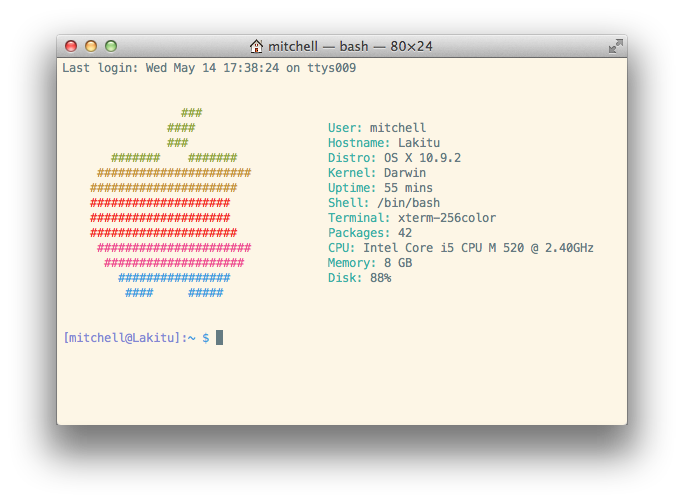
You can have fun with Homebrew too: brew install archey will get you Archey, a cool little script for displaying your Mac’s specs next to a colourful Apple logo. The selection in Homebrew is huge—and because it’s so easy to create formulas, new packages are being added all the time.
Archey—My command line brings all the boys to the yard.
JavaScript syntax 101. Here is a function declaration:
function foo() {}
Note that there's no semicolon: this is a statement; you need a separate invocation of foo() to actually run the function.
On the other hand, !function foo() {} is an expression, but that still doesn't invoke the function, but we can now use !function foo() {}() to do that, as () has higher precedence than !. Presumably the original example function doesn't need a self-reference so that the name then can be dropped.
So what the author is doing is saving a byte per function expression; a more readable way of writing it would be this:
(function(){})();
+1. This really is the best answer here, and sadly, hardly upvoted. Obviously, ! returns boolean, we all know that, but the great point you make is that it also converts the function declaration statement to a function expression so that the function can be immediately invoked without wrapping it in parentheses. Not obvious, and clearly the intent of the coder. – gilly3 Jul 28 '11 at 16:58
Quill is an open source editor built for the modern web. It is built with an extensible architecture and an expressive API so you can completely customize it for your use case. Some built in features include:
- Fast and lightweight
- Semantic markup
- Standardized HTML between browsers
- Supports Chrome, Firefox, Safari, and IE 9+
BONUS POINTS: NO NAMED FUNCTIONS - NO CONFUSION
An otherwise forgotten but very important feature on CoffeeScript is the absence of named functions. This is great, because named functions are available to all of your code regardless of the declaration order.
This makes it very easy to write some really confusing JS code:
var importantThing = veryComplicatedFunction()

// (...) A thousand lines later

function veryComplicatedFunction () { ... }
This type of organization is very damaging to the readability of your code.
CoffeeScript requires you to store functions in variables - like everything else.
ShiftIt is an application for OSX that allows you to quickly manipulate window position and size using keyboard shortcuts. It intends to become a full featured window organizer for OSX. It is a complete rewrite of the original ShiftIt by Aravindkumar Rajendiran which is not longer under development. For discussing any sort of stuff about this app, please create a new issue right here.
Stack vs Heap
So far we have seen how to declare basic type variables such as int, double, etc, and complex types such as arrays and structs. The way we have been declaring them so far, with a syntax that is like other languages such as MATLAB, Python, etc, puts these variables on the stack in C.
The Stack
What is the stack? It's a special region of your computer's memory that stores temporary variables created by each function (including the main() function). The stack is a "FILO" (first in, last out) data structure, that is managed and optimized by the CPU quite closely. Every time a function declares a new variable, it is "pushed" onto the stack. Then every time a function exits, all of the variables pushed onto the stack by that function, are freed (that is to say, they are deleted). Once a stack variable is freed, that region of memory becomes available for other stack variables.
The advantage of using the stack to store variables, is that memory is managed for you. You don't have to allocate memory by hand, or free it once you don't need it any more. What's more, because the CPU organizes stack memory so efficiently, reading from and writing to stack variables is very fast.
A key to understanding the stack is the notion that when a function exits, all of its variables are popped off of the stack (and hence lost forever). Thus stack variables are local in nature. This is related to a concept we saw earlier known as variable scope, or local vs global variables. A common bug in C programming is attempting to access a variable that was created on the stack inside some function, from a place in your program outside of that function (i.e. after that function has exited).
Another feature of the stack to keep in mind, is that there is a limit (varies with OS) on the size of variables that can be store on the stack. This is not the case for variables allocated on the heap.
To summarize the stack:
the stack grows and shrinks as functions push and pop local variables
there is no need to manage the memory yourself, variables are allocated and freed automatically
the stack has size limits
stack variables only exist while the function that created them, is running
The Heap
The heap is a region of your computer's memory that is not managed automatically for you, and is not as tightly managed by the CPU. It is a more free-floating region of memory (and is larger). To allocate memory on the heap, you must use malloc() or calloc(), which are built-in C functions. Once you have allocated memory on the heap, you are responsible for using free() to deallocate that memory once you don't need it any more. If you fail to do this, your program will have what is known as a memory leak. That is, memory on the heap will still be set aside (and won't be available to other processes). As we will see in the debugging section, there is a tool called valgrind that can help you detect memory leaks.
Unlike the stack, the heap does not have size restrictions on variable size (apart from the obvious physical limitations of your computer). Heap memory is slightly slower to be read from and written to, because one has to use pointers to access memory on the heap. We will talk about pointers shortly.
Unlike the stack, variables created on the heap are accessible by any function, anywhere in your program. Heap variables are essentially global in scope.
Stack vs Heap Pros and Cons
Stack
very fast access
don't have to explicitly de-allocate variables
space is managed efficiently by CPU, memory will not become fragmented
local variables only
limit on stack size (OS-dependent)
variables cannot be resized
Heap
variables can be accessed globally
no limit on memory size
(relatively) slower access
no guaranteed efficient use of space, memory may become fragmented over time as blocks of memory are allocated, then freed
you must manage memory (you're in charge of allocating and freeing variables)
variables can be resized using realloc()
WHEN working with Linux, Unix, and Mac OS X, I always forget which bash config file to edit when I want to set my PATH and other environmental variables for my shell. Should you edit .bash_profile or .bashrc in your home directory?
You can put configurations in either file, and you can create either if it doesn’t exist. But why two different files? What is the difference?
According to the bash man page, .bash_profile is executed for login shells, while .bashrc is executed for interactive non-login shells.
What is a login or non-login shell?
When you login (type username and password) via console, either sitting at the machine, or remotely via ssh: .bash_profile is executed to configure your shell before the initial command prompt.
But, if you’ve already logged into your machine and open a new terminal window (xterm) inside Gnome or KDE, then .bashrc is executed before the window command prompt. .bashrc is also run when you start a new bash instance by typing /bin/bash in a terminal.
Why two different files?
Say, you’d like to print some lengthy diagnostic information about your machine each time you login (load average, memory usage, current users, etc). You only want to see it on login, so you only want to place this in your .bash_profile. If you put it in your .bashrc, you’d see it every time you open a new terminal window.
Mac OS X — an exception
An exception to the terminal window guidelines is Mac OS X’s Terminal.app, which runs a login shell by default for each new terminal window, calling .bash_profile instead of .bashrc. Other GUI terminal emulators may do the same, but most tend not to.
Recommendation
Most of the time you don’t want to maintain two separate config files for login and non-login shells — when you set a PATH, you want it to apply to both. You can fix this by sourcing .bashrc from your .bash_profile file, then putting PATH and common settings in .bashrc.
To do this, add the following lines to .bash_profile:
if [ -f ~/.bashrc ]; then
source ~/.bashrc
fi
Now when you login to your machine from a console .bashrc will be called.
export makes the variable available to sub-processes.
That is,
export name=value
means that the variable name is available to any process you run from that shell process. If you want a process to make use of this variable, use export, and run the process from that shell.
name=value
means the variable scope is restricted to the shell, and is not available to any other process. You would use this for (say) loop variables, temporary variables etc.
It's important to note that exporting a variable doesn't make it available to parent processes. That is, specifying and exporting a variable in a spawned process doesn't make it available in the process that launched it.
Instant on: Your client does not download the blockchain, it uses a remote server.
Forgiving: Your wallet can be recovered from a secret seed.
Safe: Your seed or private keys are not sent to the server. Information received from the server is verified using SPV
No downtimes: Several public servers are available, you can switch instantly.
Ubiquitous: You can use the same wallet on different computers, it will auto-synchronize.
Cold Storage: You can have secure offline wallets and still safely spend from an online computer.
Open: You can export your private keys into other Bitcoin clients.
Tested and audited: Electrum is open source and was first released in November 2011.
How fast are the transactions?
Transactions are secured by being included in a block. Blocks are generated approximately every 10 minutes. Including the time to propagate a transaction through the network, today it usually takes about 15 minutes to verify inclusion in a block. For better security, one can wait until more blocks are added after the block with the transaction.
How transactions are secured?
Transactions are grouped into blocks and each block contains the signature of the previous block, thus making up a chain of blocks.
The security of the system is based on computational difficulty to generate blocks parallel to the main chain. The more blocks are created after the block containing your transaction, the harder it is to fork the chain and make the transaction invalid. Therefore, no transaction is 100% confirmed. Instead, there is a confirmation number — a number of blocks built after the transaction. Zero confirmations means that the transaction is not yet included in any block (unconfirmed). One confirmation means that the transaction is included in one block and there are no more blocks after it yet.
Today for small transactions one or two confirmations (10-20 minutes) are considered enough. For bigger transactions it is recommended to wait for at least six confirmations (1 hour). One known exception is 120 confirmations required by the protocol for the use of generated bitcoins. This is because miners (those who create blocks) have the most of computing power in the network and must have extra incentive to play fairly and generate blocks in the main chain without attempting to double-spend their rewards.
What do miners do exactly?
Miners create blocks. To create a block one needs to create a file containing unconfirmed transactions (that are not yet included in any other block), add a timestamp, a reference to the latest block and a transaction sending 50 bitcoins from nowhere to any address. Then, the miner needs to compute a signature for the block (which is basically a very long number). This signature is called hash and the process of computing is called hashing.
Computing a single hash takes very little time. But to make a valid block, the value of its hash must be smaller than some target number. The hash function is designed to be hard to reverse. That is, you cannot easily find some file contents that will produce the desired hash. You must alternate the contents of the given file and hash it again and again until you get a certain number. In the case of Bitcoin, there is a field in a file called “nonce” which contains any number. Miners increment that number each time they compute a hash until they find a hash small enough to be accepted by other clients. This may take a lot of computing resource depending on how small is the target hash value. The smaller the value, the smaller the probability of finding a valid hash.
There is no guarantee that you need to spend a certain amount of time to find a hash. You may find it quickly or not find it at all. But in average, the small enough value of block hash takes time to create. This constitutes a protection against creation of a parallel chain: to fork the chain you will need to spend more resources than the people who created the original blocks
What are the parameters of the network?
Here are some parameters of the Bitcoin chain. They may be different for alternative currencies based on the Bitcoin software (like Namecoin).
The minimum amount of bitcoins is 0.00000001 BTC.
Blocks are created every 10 minutes.
Block size is limited to 1 Mb.
Difficulty is adjusted every 2016 blocks (approx. every two weeks)
Initial reward for a block is 50 BTC.
Reward is halved every 210 000 blocks (approx. four years).
Points #5 and #6 imply that the total number of bitcoins will not exceed 21 million.
Why are blocks created every 10 minutes?
The 10 minute interval is designed to give enough time for the new blocks to propagate to other miners and allow them to start computation from a new point as soon as possible. If the interval was too short, miners would frequently create new blocks with the same parent block, which would lead to a waste of electricity, a waste of network bandwidth and delays in transaction confirmations. If it was too long, a transaction would take longer to get confirmed.
Why is the block size limited to 1 Mb?
The block size is limited to make a smoother propagation through the network, the same reason why the 10 minute interval was chosen. If the blocks were allowed to be 100 Mb in size, they would be transferred slower, potentially leading to many abandoned blocks and a decrease in the overall efficiency.
Today a typical size of a block is 50-200 Kb which makes a lot of room for growth. In the future it is possible to increase block size when the networks get faster. Decreasing time interval would not change much because the security of transactions depends on the actual time, not the number of blocks.
How can the protocol be changed?
The protocol is a list of rules that every client must follow in order to validate transactions and have their transactions validated by others. Hence, if you change the rules for yourself, other clients will simply reject your transactions and you probably will not be able to accept theirs. This makes it hard to change the protocol.
If there is a change that a vast majority of clients will find useful, then it is possible to publicly agree that starting with the block number X, new rules will apply. This will give a certain amount of time to everyone to update the software.
How does it work?
Behind the scene, Wit combines various state-of-the-art Natural Language Processing techniques and several speech recognition engines in order to achieve low latency and high robustness to both surrounding noise and paraphrastic variations (there are millions of ways to say the same thing).
Fortunately, you don’t need to care about all this machinery. We focus all our energy into creating the simplest developer experience possible. You can be up and running in a few minutes using our website. Wit will adapt to your domain over time, from ice-cream distribution to space missions. Wit makes no assumptions and remains 100% configurable.
When writing about Bitcoin many journalists use certain phrases that are not quite correct and do not explain anything to everyone else. Dear journalist, if you read this short article you will finally understand what are you talking about and outperform 99% of your colleagues.
In a short paragraph, Bitcoin can be described like this (you can take my text without asking):
Bitcoin is a payment network with its own unit of account and no single controlling entity behind it. Users make transactions between each other directly and verify them independently using cryptographic signatures. To prevent duplicate spendings, many specialized computers spend a lot of computing power to agree on a single history of transactions. Due to historical reasons, this process is called “mining” because new bitcoins are created as a reward for performing this work.
Anyone who validates next block of transactions can claim transaction fees and a fixed amount of new bitcoins. Transactions are validated at a constant rate (10 minutes in average) and every four years allowed amount of new bitcoins is halved. This means that the total amount of bitcoins is limited by the protocol (21M total, 11M already created). Transaction fees are not fixed and determined by the market.
Bitcoin mining is secondary to the whole idea and the term “mining” is unfortunate (early Bitcoins were generated before anyone was doing any transactions yet, so the whole process was called “mining” instead of “paying for transaction verification”).
One common pitfall is to start talking about mining without describing its real purpose. It is not to generate new units (who would need them?), it is to validate transactions. Bitcoins are valuable only because of robust payment network which is maintained by the miners. And miners get paid for their work in form of transaction fees and newly generated bitcoins.Second common pitfall is to say that miners “solve complex algorithms”. They do not solve anything. They do two things: transaction verification (checking digital signatures and throwing away invalid and duplicate transactions), and a long and boring computation which means a repetitive computation of a well-known algorithm with slightly different input until a “good enough” number appears as a result that will be accepted by other users as a proof of performed work. This has nothing to do with “math problems” or any other intellectual task. It is merely a way to guarantee that the resulting number really took some time to produce. This allows people to build a single chain of transactions and see that it would be economically impossible to produce a parallel chain (without trusting each other personally).
The last pitfall in describing mining is saying something like “tasks are getting more complex over time”. Tasks are not getting any more complex. The are all the same and not complex at all (any amateur programmer can understand them). But the difficulty of a boring “proof of work” is adjusted by everyone every 2 weeks to maintain the same rate of transaction validation (10 minutes). If people throw more resources at mining, difficulty will rise. If mining gets less profitable, some computers will be shut down and the difficulty will get lower. If a miner produces a “proof” which is not difficult enough, it will not be accepted by other users.
The last point is related to amount of units available. In fact, “1 Bitcoin” is a name for 100 million smallest units, thus the total amount of units ever possible is around 2100 trillion. Alternative currencies based on Bitcoin source code sometimes advertise more units (e.g. Litecoin has 4 times more), but the difference is only in names and divisibility of the total money supply, not in actual value (if you cut a pie in 10 pieces instead of 5, the total value does not really change). So it would be fair to mention that 1 bitcoin is much more divisible than dollars and euros.
Hopefully, this knowledge will help you to avoid common mistakes when writing your article and make some friends in enthusiastic Bitcoin community.
CoffeeScript instead of JSX
If you're using CoffeeScript, your source code isn't JavaScript to begin with. But turns out that CoffeeScript's flexible syntax makes it relatively painless to use the underlying API directly.
Start with shortening the DOM alias and writing more or less the same code as above. Also note that you don't need to explicitly return as the last statement in a function is implictly returned, and that the function literal syntax for argumentless function is just a bare ->:
R = React.DOM
# ...

render: ->
  R.p(null, R.a({href:'foo'}, 'bar'))
But you can do better. First, CoffeeScript knows to insert the curlies on an object literal because of the embedded colon.
R.p(null, R.a(href:'foo', 'bar'))
And then you can remove the parens by splitting across lines. When providing args to a function, a comma+newline+indent continues the argument list. Much like Python, the visual layout follows the semantic nesting.
  R.p null,
    R.a href:'foo', 'bar'
In fact, beyond the first argument, the trailing commas are optional when you have newlines. Here's the same thing again with two links inside the <p>:
CoffeeScript also makes every statement into an expression, which is a familiar feeling coming from functional programming. It means you can use statement-like keywords like if and for on the right hand side of an equals sign, or even within a block of code like the above.
Here's a translation of the (7-line) <ol> example from above.
R.ol null,
  for result in @results
    R.li key:result.id, result.text
There is one final feature of CoffeScript that I find myself using, which is an alternative syntax for object literals. For example, suppose in the above example the "key" attribute needs to be computed from some more complicated expression:
R.ol null,
  for result, index in @results
    resultKey = doSomeLookup(result, index)
    R.li key:resultKey, result.text
The simplification is that, within a curly-braced object literal, entries without a colon use the variable name as the key. The above could be equivalently written:
R.ol null,
  for result, index in @results
    key = doSomeLookup(result, index)
    R.li {key}, result.text
This is particularly useful when the attributes you want to set have meaningful names -- key is pretty vague, but if you construct an href and a className variable it's pretty clear where they are going to be used. These can be mixed with normal key-value pairs, too, like:
Putting it all together, here's a larger example, part of an implementation of an "inline edit" widget. To the user, this widget is some text with a "change" button to its right, where clicking on "change" swaps the line of text out for an edit field positioned in the same place, allowing the user to make a change to the value directly. (Like how it works in a spreadsheet.) The first branch of the if is the widget's initial state; the @edit function flips on the @state.editing flag.
render: ->
  if not @state.editing
    R.div null,
      @props.text
      ' '  # space between text and button
      R.span className:'link-button mini-button', onClick:@edit, 'change'
  else
    R.div style:{position:'relative'},
      R.input
        style:{position:'absolute', top:-16, left:-7}
        type:'text', ref:'text', defaultValue:@props.text
        onKeyUp:@onKey, onBlur:@finishEdit
To get a feel for these rules, you can just experiment and look at the generated JavaScript. Or you can go to coffeescript.org and click the "Try CoffeeScript" tab, where you can enter nonsense expressions there just to experiment with the syntax.
There are many other special keys on a typical keyboard that do not normally send characters. These include the four arrow keys, navigation keys like Home and Page Up, special function keys like Insert and Delete, and the function keys F1 through F12. Internet Explorer and WebKit 525 seem to classify all of these with the modifier keys, since they generate no text, so in those browsers there is no keypress event for them, only keyup and keydown. Many other browsers, like Gecko, do generate keypress events for these keys, however.
I've reviewed the bulk of tickets regarding keypress on both the Chrome, Chromium and Webkit bug trackers and it would appear that there are no intentions on supporting correct keypress behavior from any of these camps now or in the future. The reason for this is that a) keypress and its behavior is not mentioned specifically in any specs and b) Although FireFox and Opera support this feature, Webkit (used by Chrome and Safari) decided to copy the IE behavior in this case which reserves arrow keypresses for internal browser behavior only. There is no way that jQuery can circumvent this behavior and it is instead recommended that you use keydown instead as this is supported.
The process that the browser goes through is pretty simple: calculate the styles that apply to the elements (Recalculate Style), generate the geometry and position for each element (Layout), fill out the pixels for each element into layers (Paint Setup and Paint) and draw the layers out to screen (Composite Layers). To achieve silky smooth animations you need to avoid work, and the best way to do that is to only change properties that affect compositing -- transform and opacity. The higher up you start on the timeline waterfall the more work the browser has to do to get pixels on to the screen. Animating Layout Properties Here are the most popular CSS properties that, when changed, trigger layout: width, height, padding, margin, display, border-width, border, top, position, font-size, float, text-align, overflow-y, font-weight, overflow, left, font-family, line-height, vertical-align, right, clear, white-space, bottom, min-height Animating Paint Properties Changing an element may also trigger painting, and the majority of painting in modern browsers is done in software rasterizers. Depending on how the elements in your app are grouped into layers, other elements besides the one that changed may also need to be painted. There are many properties that will trigger a paint, but here are the most popular: color, border-style, visibility, background, text-decoration, background-image, background-position, background-repeat, outline-color, outline, outline-style, border-radius, outline-width, box-shadow, background-size If you animate any of the above properties the element(s) affected are repainted, and the layers they belong to are uploaded to the GPU. On mobile devices this is particularly expensive because CPUs are significantly less powerful than their desktop counterparts, meaning that the painting work takes longer; and the bandwidth between the CPU and GPU is limited, so texture uploads take a long time. Animating Composite Properties There is one CSS property, however, that you might expect to cause paints that sometimes does not: opacity. Changes to opacity can be handled by the GPU during compositing by simply painting the element texture with a lower alpha value. For that to work, however, the element must be the only one in the layer. If it has been grouped with other elements then changing the opacity at the GPU would (incorrectly) fade them too. In Blink and WebKit browsers a new layer is created for any element which has a CSS transition or animation on opacity, but many developers use translateZ(0) or translate3d(0,0,0) to manually force layer creation. Forcing layers to be created ensures both that the layer is painted and ready-to-go as soon as the animation starts (creating and painting a layer is a non-trivial operation and can delay the start of your animation), and that there's no sudden change in appearance due to antialiasing changes. Promoting layers should done sparingly, though; you can overdo it and having too many layers can cause jank. Imperative vs Declarative Animations Developers often have to decide if they will animate with JavaScript (imperative) or CSS (declarative). There are pros and cons to each, so let’s take a look: Imperative The main pro of imperative animations happens to also be its main con: it’s running in JavaScript on the browser’s main thread. The main thread is already busy with other JavaScript, style calculations, layout and painting. Often there is thread contention. This substantially increases the chance of missing animation frames, which is the very last thing you want. Animating in JavaScript does give you a lot of control: starting, pausing, reversing, interrupting and cancelling are trivial. Some effects, like parallax scrolling, can only be achieved in JavaScript. Declarative The alternative approach is to write your transitions and animations in CSS. The primary advantage is that the browser can optimize the animation. It can create layers if necessary, and run some operations off the main thread which, as you have seen, is a good thing. The major con of CSS animations for many is that they lack the expressive power of JavaScript animations. It is very difficult to combine animations in a meaningful way, which means authoring animations gets complex and error-prone.
Instead of SPDY, we resorted to plain old HTTPS. We used a scheme where clients would send HTTP requests with multiple image urls (batch requests): GET https://photos.dropbox.com/thumbnails_batch?paths= /path/to/thumb0.jpg,/path/to/thumb1.jpg,[...],/path/to/thumbN.jpg The server sends back a batch response: HTTP/1.1 200 OK Cache-Control: public Content-Encoding: gzip Content-Type: text/plain Transfer-Encoding: chunked 1:data:image/jpeg;base64,4AAQ4BQY5FBAYmI4B[...] 0:data:image/jpeg;base64,I8FWC3EAj+4K846AF[...] 3:data:image/jpeg;base64,houN3VmI4BA3+BQA3[...] 2:data:image/jpeg;base64,MH3Gw15u56bHP67jF[...] [...] The response is: 1. Batched: we return all the images in a single plain-text response. Each image is on its own line, as a base-64-encoded data URI. Data URIs are required to make batching work with the web code rendering the photos page, since we can no longer just point an