Asynchronous and deferred JavaScript execution explained
Asynchronous and deferred JavaScript execution explained - defer 會先拉, 然後等到 HTML parser 直行完才會跑 javascript, async 會拉完javascript馬上執行, 可以跑一些與 DOM 無關的 javascript, 此外, async是一拉完就執行不保證會按照順序執行, defer會按照順序執行
HTML5's async Script Attribute
- Normal execution <sscript> This is the default behavior of the <script> element. Parsing of the HTML code pauses while the script is executing. For slow servers and heavy scripts this means that displaying the webpage will be delayed.
- Deferred execution <script defer> Simply put: delaying script execution until the HTML parser has finished. A positive effect of this attribute is that the DOM will be available for your script. However, since not every browser supports defer yet, don’t rely on it!
- Asynchronous execution <script async> Don’t care when the script will be available? Asynchronous is the best of both worlds: HTML parsing may continue and the script will be executed as soon as it’s ready. I’d recommend this for scripts such as Google Analytics.
Both async and defer scripts begin to download immediately without pausing the parser and both support an optional onload handler to address the common need to perform initialization which depends on the script. The difference between async and defer centers around when the script is executed. Each async script executes at the first opportunity after it is finished downloading and before the window’s load event. This means it’s possible (and likely) that async scripts are not executed in the order in which they occur in the page. The defer scripts, on the other hand, are guaranteed to be executed in the order they occur in the page. That execution starts after parsing is completely finished, but before the document’s DOMContentLoaded event.

 map:
map: 
 Search by taking a picture: point your mobile phone camera at a painting, a famous landmark, a barcode or QR code, a product, a storefront, or a popular image. If Goggles finds it in its database, it will provide you with useful information.
Goggles can read text in English, French, Italian, German, Spanish, Portuguese, Russian, and Turkish, and translate it into other languages.
Goggles also works as a barcode / QR code scanner.
Search by taking a picture: point your mobile phone camera at a painting, a famous landmark, a barcode or QR code, a product, a storefront, or a popular image. If Goggles finds it in its database, it will provide you with useful information.
Goggles can read text in English, French, Italian, German, Spanish, Portuguese, Russian, and Turkish, and translate it into other languages.
Goggles also works as a barcode / QR code scanner.


 Leam to Kem? Learn to Kern?
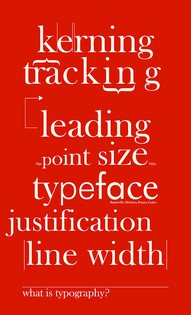
上面這張圖的意思是說,如果沒有好的kerning,就會把rn連在一起,變成了m;拉丁字中有特定幾個字若是太近,會影響辨識度,就有如上面的例子。kerning的技巧正是在此時派上用場,調整特定字母的距離,增加字體的辨識程度。話說,"typograpy"原本是來自於活版印刷。早在這種古早年代,西方人就發現會有這樣的問題。例如下圖的T,如果沒有特殊處理,會跟兩邊的字母隔得太遠,導致有"SEE YOU A T NINE."這種令人不解的拼字。所以他們就發明了Kerning這個技巧,來把特定字母與兩邊字母的距離正常化。
Leam to Kem? Learn to Kern?
上面這張圖的意思是說,如果沒有好的kerning,就會把rn連在一起,變成了m;拉丁字中有特定幾個字若是太近,會影響辨識度,就有如上面的例子。kerning的技巧正是在此時派上用場,調整特定字母的距離,增加字體的辨識程度。話說,"typograpy"原本是來自於活版印刷。早在這種古早年代,西方人就發現會有這樣的問題。例如下圖的T,如果沒有特殊處理,會跟兩邊的字母隔得太遠,導致有"SEE YOU A T NINE."這種令人不解的拼字。所以他們就發明了Kerning這個技巧,來把特定字母與兩邊字母的距離正常化。
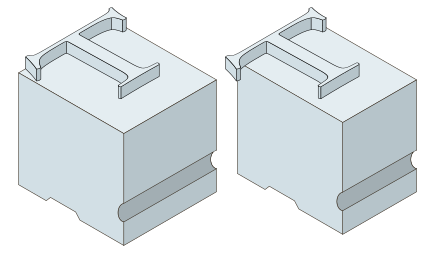 如同所見,右邊的T稍微突出方塊,才能在印刷時與前一個字母保持合理距離。
其實,"kerning"一詞的字源來自"corner",強調的是一個字母語兩邊合宜的距離關係。"kerning"這個詞在k與e之間,r與n之間其實就有kerning,保持適當距離,提高辨識度。只是,kerning並不能被理解為「字元間距」,字元間距是上面那張圖的第二個:tracking。
每個字元的距離就是tracking
在網頁排版的css語法中,相對應"tracking"的語法就是letter-spacing,描述的是每個字母之間的平均距離。例如這個單字tracking就採取了0.5em的字元間距。tracking與kerning具體而言的差異是,tracking只是有關於調整每個字母之間的「平均」距離;而kerning雖然也是調整距離的概念,但強調的是一個單字中,特定字母的合宜距離,這種距離對辨識度很重要。
Leading不是領導,是行距
其實在typography中,leading發音為"ledding",而不是領導的進行式那個發音。但說來也巧,leading可以說是字型排版學中一個無比重要的觀念,有如引領眾規則的老大。因為適當的行距給了字體呼吸空間,當然也就讓內容更加好讀了;但如果連呼吸空間都未顧及,那麼其他再好的排版設計都沒有用。而且行距的設定其實也是有學問的。在傳統的平面設計中,垂直的韻律就是一種設定行距的規則,而且不管印刷或螢幕顯示都相當適用。
字型、字體,傻傻分不清楚
其實寫文章的時候,我們也會兩者混用。但字型(fonts)與字體(typeface)是不完全一樣的概念。這仍舊要追溯到古早的活字。那個時候,一個字型就是一塊金屬(鉛塊、木頭)上面刻的字,它的樣式(例如粗體、斜體)以及大小是固定不變的。嚴格來說,這才叫做一種「字型」;而「字體」則是同一款字型的「集合」:在相同的風格中,一套字體有不同的粗細、大小與樣式。例如,信黑體W3的12號字是一種字型,但信黑體本身是一套「字體」。然而,在數位時代中,數位字型可以被輕易的放大縮小,以至於字型與字體兩種概念的分野似乎不再那麼重要。但我們還是希望能夠強調字體這種成「套」的概念。因為在設計上很少只用到一種字型,必須要使用字體,才能同時風格一致,又能用各種不同粗細大小的字互補。
如同所見,右邊的T稍微突出方塊,才能在印刷時與前一個字母保持合理距離。
其實,"kerning"一詞的字源來自"corner",強調的是一個字母語兩邊合宜的距離關係。"kerning"這個詞在k與e之間,r與n之間其實就有kerning,保持適當距離,提高辨識度。只是,kerning並不能被理解為「字元間距」,字元間距是上面那張圖的第二個:tracking。
每個字元的距離就是tracking
在網頁排版的css語法中,相對應"tracking"的語法就是letter-spacing,描述的是每個字母之間的平均距離。例如這個單字tracking就採取了0.5em的字元間距。tracking與kerning具體而言的差異是,tracking只是有關於調整每個字母之間的「平均」距離;而kerning雖然也是調整距離的概念,但強調的是一個單字中,特定字母的合宜距離,這種距離對辨識度很重要。
Leading不是領導,是行距
其實在typography中,leading發音為"ledding",而不是領導的進行式那個發音。但說來也巧,leading可以說是字型排版學中一個無比重要的觀念,有如引領眾規則的老大。因為適當的行距給了字體呼吸空間,當然也就讓內容更加好讀了;但如果連呼吸空間都未顧及,那麼其他再好的排版設計都沒有用。而且行距的設定其實也是有學問的。在傳統的平面設計中,垂直的韻律就是一種設定行距的規則,而且不管印刷或螢幕顯示都相當適用。
字型、字體,傻傻分不清楚
其實寫文章的時候,我們也會兩者混用。但字型(fonts)與字體(typeface)是不完全一樣的概念。這仍舊要追溯到古早的活字。那個時候,一個字型就是一塊金屬(鉛塊、木頭)上面刻的字,它的樣式(例如粗體、斜體)以及大小是固定不變的。嚴格來說,這才叫做一種「字型」;而「字體」則是同一款字型的「集合」:在相同的風格中,一套字體有不同的粗細、大小與樣式。例如,信黑體W3的12號字是一種字型,但信黑體本身是一套「字體」。然而,在數位時代中,數位字型可以被輕易的放大縮小,以至於字型與字體兩種概念的分野似乎不再那麼重要。但我們還是希望能夠強調字體這種成「套」的概念。因為在設計上很少只用到一種字型,必須要使用字體,才能同時風格一致,又能用各種不同粗細大小的字互補。

 Update: Syd Lawrence points out that it’s worth using pointer-events: none on the mask. This is the CSS property that makes the front layer porous, allowing mouse clicks to cheekily slip through to the element behind it.